Jelly Fish Display Font Review for Makers
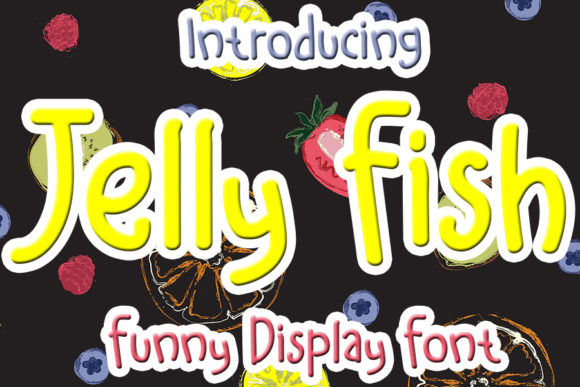
I was staring at a blank Canva canvas, trying to design a set of boutique gift tags for my upcoming summer collection, when I realized my usual go-to script font felt too serious. It lacked that pop of personality needed for a brand that wants to feel approachable and fun. That was the moment I decided to test drive Jelly Fish, a cute and playful display font described as colorful and joyful. As a designer who creates digital downloads and physical printables, I need typefaces that not only look good on screen but also hold up when printed on stickers, mugs, and packaging. After spending an afternoon experimenting with this Display typeface, I’m ready to share how it performs in real-world maker scenarios.
Jelly Fish for Cute and Playful Product Labels
When you are designing product labels, especially for items like bath bombs, candles, or handmade soaps, the typography needs to convey the vibe of the product instantly. Jelly Fish is a cute and playful display font that immediately signals joy and creativity. I tested this font on a series of circular sticker mockups intended for candle jars. The rounded, bubbly nature of the letters gave the label an artisanal yet modern feel that stood out against plain kraft paper backgrounds.
The visual personality of Jelly Fish makes it an excellent choice for short phrases. I used it for words like "Lavender," "Citrus," and "Relax." Because it is a Display font, it commands attention. However, I found that it works best when paired with a clean sans serif font for the smaller details like ingredients or weight. This combination ensures that while the brand name pops with character, the necessary information remains legible. If you are selling on platforms like Etsy, where thumbnails are small, using Jelly Fish for your main logo text can help your listing images catch the eye without looking cluttered.
Jelly Fish in Digital Downloads and Printable Art
As a creator of printable wall art and planner pages, I often look for fonts that add emotional appeal to digital products. Jelly Fish is a cute and playful display font that brings a sense of whimsy to any design asset. I created a set of nursery wall prints featuring motivational quotes for children. Using Jelly Fish for the key words in the quote added a layer of charm that resonated with parents looking for cheerful decor.
In the world of Fonts for digital downloads, versatility is key. While Jelly Fish is highly decorative, it maintains enough clarity to be readable even at moderate sizes. I recommend using it for titles, headers, or single-line quotes rather than body text. For example, in a birthday invitation template, using Jelly Fish for the age number or the word "Celebration" creates a focal point that guides the viewer’s eye. When designing these assets, remember to check the file formats included with the font. Having both OTF and TTF files ensures compatibility with various design software, from Adobe Illustrator to Procreate, allowing you to create high-quality commercial font designs for your shop.
Jelly Fish for Wedding Invitations and Elegant Branding
You might assume that a playful font isn't suitable for formal events, but Jelly Fish challenges that notion by offering a modern twist on elegance. I explored using this typeface for a casual beach wedding welcome sign and a rustic barn wedding menu. The font’s joyful character softened the formality of traditional stationery, making the event feel more inviting and relaxed. It proved to be a go-to choice for brands that want to blend sophistication with a touch of fun.
For wedding branding, consistency is crucial. I paired Jelly Fish with a simple, thin serif font to create a balanced hierarchy. The playful nature of Jelly Fish worked beautifully for the couple’s names, while the serif font handled the schedule details. This pairing demonstrates how a creative font can enhance brand identity without overwhelming the design. When preparing mockups for clients or personal projects, ensure that the contrast between the decorative font and its partner is distinct. This technique elevates the perceived quality of your design services, whether you are creating physical invitations or digital save-the-date graphics.
Jelly Fish on Physical Merchandise and Cricut Projects
For crafters using cutting machines like Cricut or Silhouette, the cutability of a font is just as important as its aesthetics. Jelly Fish is a cute and playful display font that generally cuts well, provided you pay attention to spacing. I tested it on vinyl decals for tote bags and water bottles. The thick strokes of the letters held up nicely on curved surfaces, maintaining their shape and preventing ink bleed or vinyl tearing during weeding.
However, there are limitations to keep in mind. Due to its decorative style, Jelly Fish is not suitable for very tiny cuts or dense label information. If you are designing a small product tag with detailed care instructions, stick to a simpler sans serif font for the fine print. Use Jelly Fish for the brand name or the main title of the product. Also, consider the color options available in your design software; since the font is described as colorful and joyful, experimenting with bright hues can enhance its impact on merchandise. Always do a test cut on scrap material first to ensure the machine settings are correct for the specific vinyl or fabric you are using.
Jelly Fish for Seasonal Products and Shop Packaging
Seasonal products require a quick shift in mood and aesthetic, and Jelly Fish adapts surprisingly well to holiday themes. I used it for Christmas gift tags, Easter egg labels, and Halloween party favors. The font’s inherent playfulness fits perfectly with the festive spirit of these occasions. Whether you are designing digital templates for instant download or physical packaging for a boutique shop, Jelly Fish adds a layer of emotional appeal that customers respond to positively.
When arranging product packaging for a shop listing, typography plays a huge role in customer recognition. A consistent use of Jelly Fish across your business cards, shipping labels, and thank-you notes can strengthen your brand presence. It helps create a cohesive experience from the moment a customer sees your listing image to the moment they unbox their purchase. Remember to review the licensing agreement before selling physical products made with this font. Most premium fonts allow for commercial use on physical goods, but some may have restrictions on the number of items produced. Understanding these terms protects your business and allows you to focus on what you do best: creating beautiful, heartfelt products.